📣 Ads & publishing

An ad, finished —
and published on its own

Most tools stop the moment the image is ready, and then it sits in your downloads folder. Here you say what you sell, you get a complete ad — and it goes out to Facebook, Instagram, TikTok and LinkedIn on the schedule you set.

Four networks · An approval queue before anything publishes

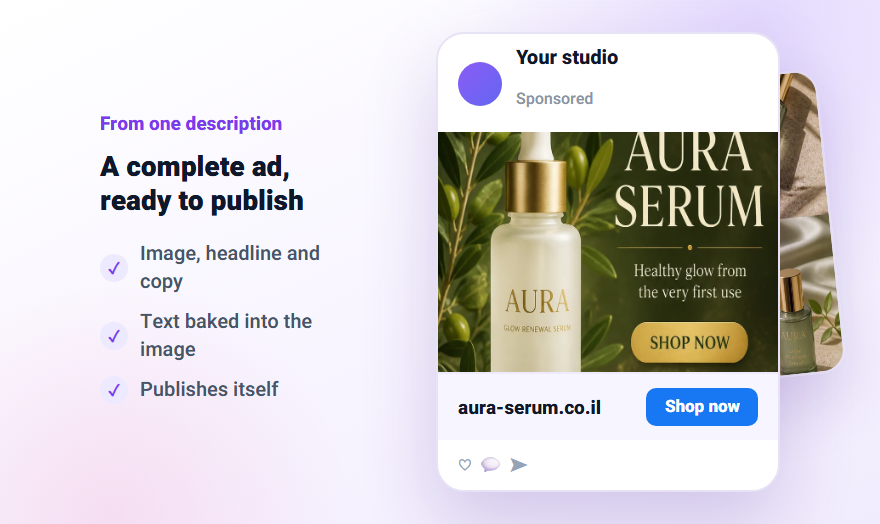
Two finished social ads
4connected networks
1:1 · 4:5 · 9:16aspect ratios
Approval queuebefore every post
Instantor scheduled
Creating

A complete ad, not just a nice picture

Write one sentence about what you sell — and the system assembles all of it: the image, the headline, the body copy and the button. The business details you filled in once flow into every creative.

From one description to a finished ad

The AI generates the ad image and the copy around it, in the language you choose, matched to your industry and to what you wrote. Pick the aspect ratio per network, or produce a multi-image carousel instead of a single frame.

  • An aspect ratio per network — square, vertical, story
  • A multi-image carousel in one click
  • Every creative saved to your library automatically
You writeNatural hydrating serum, 30ml, 40% off launch offer
HeadlineHealthy glow from the very first use
BodyNiacinamide and hyaluronic acid. No fragrance, no parabens.
ButtonShop now
ImageGenerated with your product inside the scene

Got a product? It goes inside the design

Upload a product shot on a clean background, pick a style — and the product is composed into the ad. You can also start from a website address: the system reads it and writes the ad description itself.

  • 12 ready design styles
  • Start from an existing website URL
  • Your brand palette carried into every creative
A designed social ad with a product
Publishing

This is the part nobody else does for you

Once the ad is ready the real work starts. Here it ends with a click.

Four networks from the same screen

Facebook, Instagram, TikTok and LinkedIn. Connect the account once in settings, and every post goes out to the networks you picked — immediately or at the time you set.

  • Instant publishing for a single post
  • Scheduling by day and hour
  • Organic posts with no media budget
fFacebookconnected
Instagramconnected
TikTokconnected
inLinkedInconnected

Nothing goes out without you seeing it

Every post the system produces waits in an approval queue. You approve, edit or reject it — and only then does it publish. Automation without surprises.

Saturday morning postawaiting approval✓ Approve
End-of-month offerscheduled for Aug 28, 19:00approved
Weekly tippublished to Facebook and Instagrampublished

Want budget behind it? There is a wizard for that

A paid campaign is built in simple steps: what the goal is (sales, leads, website visits or WhatsApp messages), what the daily budget is and who the audience is. No media buyer, and none of Meta's complicated ads interface.

  • Goal, budget and audience across three screens
  • A built-in daily budget ceiling for protection
  • Performance tracking after it goes live
1Goal
SalesLeadsWhatsApp
2Daily budget
$25 a day · built-in ceiling
3Audience
Age 25-45RegionInterest: skincare
The engine behind it

Your ads are built from what already worked in the market

This tool does not invent a design out of thin air. It leans on analysis of ads and posts that genuinely ran — including how long they ran, what was said in the first second, and what made people stop.

That is how an ad comes out sharp instead of generic

An ad that has been running at a competitor for a month is evidence it is making money. The system reads those patterns — headline structure, the type of promise, where the price and the button sit — and applies them to your product, in your language and your brand voice.

  • Grounded in ads and posts that actually ran
  • Headline structure and promise — not just a nice image
  • Matched to your language and your brand
1
Read what already workedPosts and ads that genuinely ran — with their view counts and how long they ran
2
Break down the mechanismWhat was said in the first second, how the promise was built, what held the viewer
3
Assemble your versionSame mechanism, your product and your language — ready to publish
How it works

Three steps from idea to published

1

Describe what you sell

One sentence. Your business details and colours are already saved and flow in on their own.

2

Pick an ad

From what was generated — and you can produce variations until something feels right.

3

Approve and publish

Now or on a schedule, to the networks you chose. All from this screen.

FAQ

What to know

Do I need an ad account or a campaign manager?
For organic posts, no — connecting the page is enough. A paid campaign needs an ad account; if you do not have one, you can create it from inside the system.
Which languages does the ad copy support?
The copy and the on-image text are written in the language you pick, including right-to-left languages, which are laid out in the correct direction rather than mirrored.
Can I edit a post the system generated?
Yes. Every post waits in the approval queue and you can change the text, swap the image or reject it entirely before it goes out.
What if I blow through my daily budget?
There is a built-in daily budget ceiling, and activating a campaign requires an extra verification step — so nobody switches on a large spend by accident.
Can I publish videos too?
Yes. Clips exported from the video studio are saved to your library and are available to publish like any image.

Ready to start?

Create your account and run this on your own business — no designer, no photographer, no developer.

Instagram carousels Video studio Competitor research Product photos Website builder